Subtitles are more than a transcript with timestamps. They help a viewer follow speech, identify a line in a long lesson, and translate a permitted video without losing the order of what was said. A useful SRT file contains numbered cues, start and end times, and text. A plain copy of the words from a page may help with search, but it cannot be dropped into a video editor and expected to sync. That distinction matters when you choose what to download.
This guide is for captions attached to a public YouTube video that you own or are permitted to use. It explains how to inspect the available tracks, choose between a creator-supplied caption and an automatic caption, save a timed file, and verify the result before translating or studying from it. It also explains what the downloader cannot do. If the source video has no accessible caption track, a subtitle downloader cannot truthfully manufacture the creator's original SRT.
Know what an SRT file contains
An SRT is a text file with a simple time-coded structure. Each cue has a number, a start time, an end time, and the subtitle text. A compatible editor or player uses those times to display the line while the video plays. If the file has only words and no timecodes, it is a transcript, not an SRT. If the times are shifted, the text may be accurate but unhelpful to a viewer. Open the file in a text editor once so you know what you actually saved.
The file extension does not establish correctness. Renaming a .txt transcript to .srt will not add timings. Conversely, an SRT that opens as plain text is normal; it does not need a special binary format. When checking a file, look for a cue number followed by a pair of timestamps separated by an arrow. Then import a working copy into the video player or editor you plan to use. The real test is whether the first, middle, and final cues line up with the speech.
Subtitles may include speaker labels, sound descriptions, or on-screen text. A study note may need only spoken words; an accessible caption file may need more context. Do not casually strip bracketed information such as [music] or [door closes] if the file will serve viewers who rely on captions. If you are translating, preserve the meaning and timing of those cues rather than treating them as decoration.
Choose the right caption track
YouTube videos can carry captions uploaded by the creator, captions generated automatically, translated tracks, or no available subtitles. The menu shown to viewers is a useful starting point, but a downloader should inspect what the source actually exposes for the individual video. A language label may identify a track without telling you whether it was human-reviewed. Automatic captions often struggle with names, accents, overlapping speakers, and technical vocabulary. For legal, medical, or safety material, treat them as a rough aid until a qualified person verifies the text.
Choose a source-language track for translation when you can. Translating an already machine-translated subtitle can compound mistakes. If the creator supplied a reviewed English caption file for an English video, it is generally a better starting point than an automatic English transcript. If the video is in another language, do not assume a displayed English translation is authorized or complete. Compare it with the speech and the context of the video.
Look at the track's time coverage. Some videos have captions only for an introduction or a short segment. Others have a title card before speech begins, which can explain why the first subtitle starts late. A track that ends before the video does may still be complete if the remaining footage has no speech. Check the content, not just a percentage calculated from runtime.
A careful download workflow
Open one public video and paste its watch URL into the subtitle downloader.
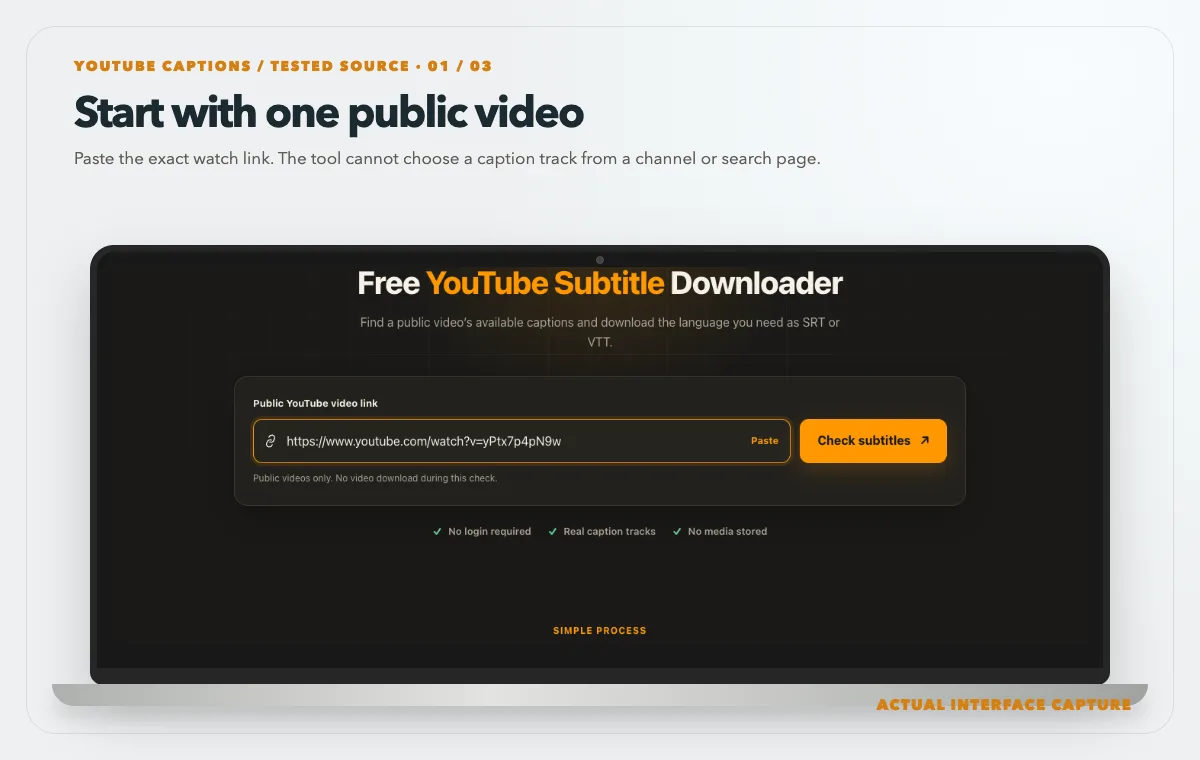
Paste the exact watch link. The tool cannot choose a caption track from a channel or search page. Device mockup contains an actual tool-interface capture from the tested public sample link. Check each language label and choose an available SRT track when timed text is needed.
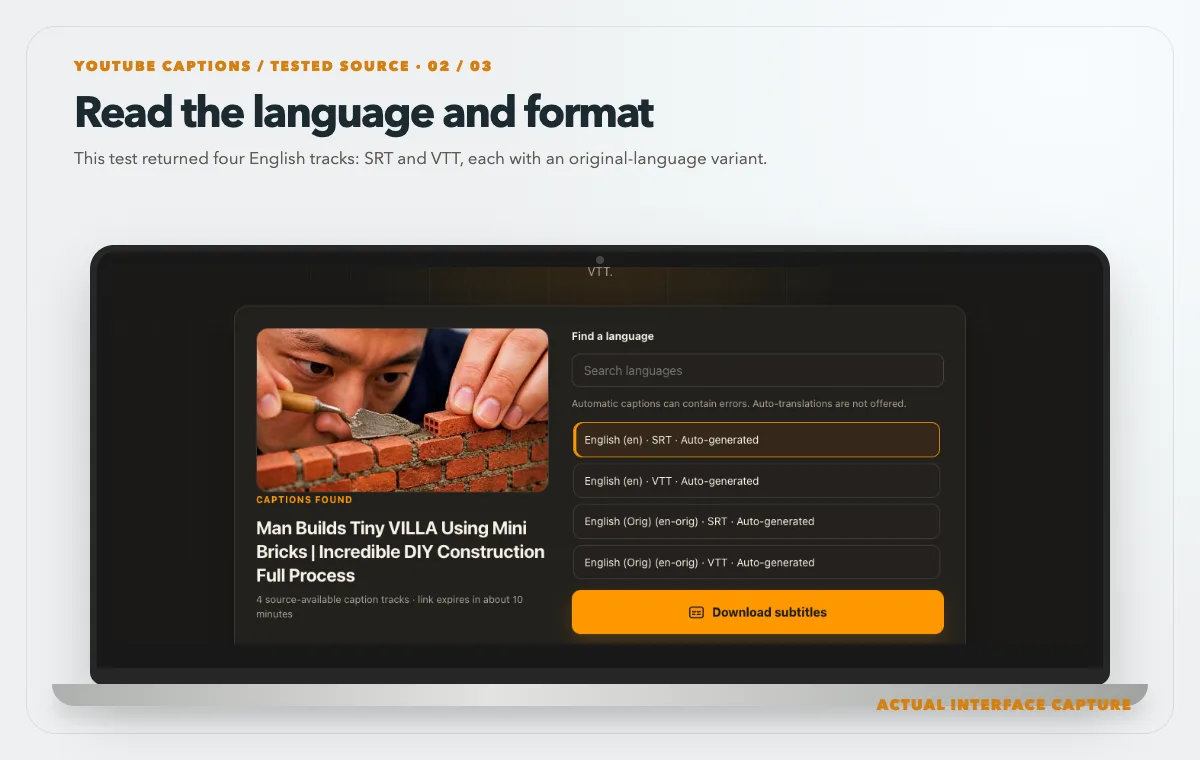
This test returned four English tracks: SRT and VTT, each with an original-language variant. Device mockup contains an actual tool-interface capture from the tested public sample link. Use the download control, then open the saved file and compare its timecodes with the video.
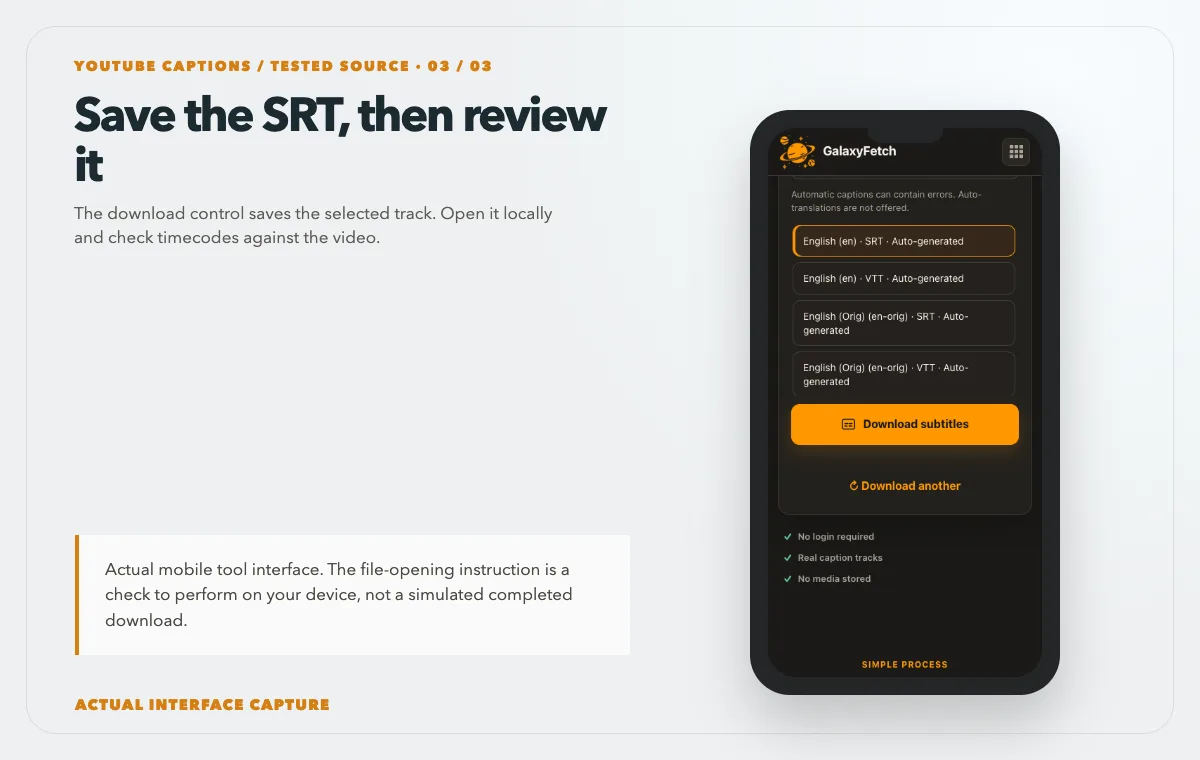
The download control saves the selected track. Open it locally and check timecodes against the video. Device mockup contains an actual tool-interface capture from the tested public sample link.
Open the individual public video, copy its watch or share link, and go to the YouTube Subtitle Downloader. Paste the link and check for available subtitle choices. Select the language and format the source actually offers. If SRT is available, download it, then open the saved file from your computer rather than assuming a browser preview is sufficient. Keep the source URL and track language in the filename or a nearby note.
I checked this page on 1 October 2026 with the public watch link shown in the tutorial images. The tool returned four English choices: auto-generated SRT and VTT tracks, including English-original variants. The screenshots show the real options and download control. They do not prove caption accuracy, so open the saved SRT and verify its timecodes against the actual video before relying on it.
If the tool offers several languages, do not download the first one automatically. Match the label to the spoken language and your task. For study, the original-language caption may help you hear unfamiliar words. For translation, a carefully reviewed source-language transcript reduces avoidable errors. For accessibility, the track needs to represent the final published video and include relevant non-speech audio where possible.
After saving, make a copy before editing. Keep the untouched download as evidence of what the source provided on that date. Work on a second file with a clear suffix such as -reviewed or -fr-translation. Encoding matters: if accented characters display as boxes or question marks, inspect the text encoding in a capable editor. UTF-8 is a common choice. Do not fix an encoding problem by manually deleting diacritics that belong in the language.
Check timing against the actual video
Play the video while the downloaded subtitles are loaded in a local player or editor. Examine an early sentence, a sentence near the middle, and the final spoken sentence. If all are shifted by the same amount, the player or editor may be applying an offset. If the drift grows over time, the file may belong to a different cut, use a different frame or timebase, or have been generated from a source with changed timing. A one-line offset fix will not repair progressive drift.
When the video has an introduction, advertisement, or a replaced section, a caption file for a prior cut may diverge after that edit. The same title does not prove that two uploads are identical. Compare the exact URL and runtime. If you own the video and have the project, export fresh subtitles from the final edit. That is safer than forcing an older SRT to fit a new cut.
Read a sample of the text. Automatic captions can turn a person’s name into a common word or omit a small but crucial negative. For study notes, mark uncertain passages and replay them. For a public translation, have a knowledgeable speaker review the source and translated text. A file can be technically valid SRT yet convey the wrong meaning. Accuracy and timing are separate checks.
Do not overlook line length and reading speed. A caption that covers several lines of speech in one long block can be difficult to follow on a phone. If you are creating an improved authorized caption file, split cues at natural phrases and leave enough time to read them. Avoid changing the underlying meaning to force a line to fit. A downloadable source file is a starting point, not a completed accessibility audit.
Use subtitles for study without losing context
For a lecture, SRT timestamps are valuable because they connect notes to exact moments. Keep the video URL, the caption file, and your notes in the same project folder. Instead of copying the entire caption file into a document and forgetting where it came from, cite the relevant time range. A timestamp lets you return to the slide, speaker gesture, or chart that gives the line meaning.
Search within a text editor for an unfamiliar term, then play the corresponding cue in the video. If the word looks strange, do not assume the speaker said it. Listen again, slow the playback if needed, and consult the surrounding sentence. Automatic speech recognition is especially prone to errors with names and specialized terms. This method turns subtitles into a navigation aid rather than an unquestioned transcript.
If you are building flashcards from a language-learning video, use short examples and keep the original audio available. The text may omit hesitation, pronunciation, or visual context. A caption track may also simplify spoken grammar. For personal study this can be useful, but publishing a full copied subtitle file or translated version may require the creator's permission. Respect the intended license and any course rules.
Translate from a sound source
Translation is not a mechanical replacement of each word. Check who is speaking, whether a phrase is idiomatic, and whether on-screen labels need separate translation. Keep the timecodes aligned with the original cut while allowing enough reading time in the target language. Some languages need more characters to express the same thought, which can require careful cue breaks. Do not simply lengthen every cue if that makes it overlap the next one.
If the source captions are automatic, verify them before translating. Otherwise you risk translating recognition errors with great fluency. A reviewer who knows the source language should compare uncertain lines with the video. Then a reviewer of the target language should read the translated SRT while watching the result. These are two distinct quality checks. A polished translation of the wrong source sentence is still wrong.
Maintain a small change log when working with collaborators: source track, date downloaded, reviewer, target language, and any sections whose meaning was uncertain. If the video is updated or re-edited, revisit the caption file. The old SRT may still open, but the timestamps may no longer match. A filename containing the video ID or project version helps you avoid silently attaching a translation to the wrong upload.
Troubleshooting real failure patterns
No subtitles are listed. Open the video on YouTube and check whether captions are available there. If none are visible, the tool may have nothing to retrieve. If captions appear in YouTube but not in the downloader, the source may have changed how it exposes the track or temporarily blocked access. Note the public URL, language, and whether the track was automatic for a support report.
The saved link returns “source unavailable.” Subtitle source URLs can expire. Recheck the video to obtain a fresh link instead of bookmarking a temporary caption URL. If the underlying video has become private or removed, an old caption link should not be expected to remain valid. Save the actual SRT to your device while the offered link works.
The SRT contains strange characters. Open it in a text editor that lets you inspect encoding. Try UTF-8 rather than deleting accented letters. If the file was converted from another caption format, verify that line breaks and arrows are still valid. Keep the untouched original while you test a repair.
Captions are out of sync. Confirm that the SRT belongs to the exact video and cut. Compare early, middle, and late cues. A consistent offset can often be corrected in an editor; increasing drift needs a deeper timing review. Do not publish a visibly mistimed translation as if it were an accessibility improvement.
The language is wrong. Recheck the language code and whether the option is an automatic translation rather than a source track. A regional variant may be labeled differently. Listen to the video and inspect a few lines before committing to a translation workflow.
There is only VTT or another format. Some sources expose WebVTT rather than SRT. A trustworthy caption editor can convert a permitted file, but inspect the converted timestamps and styling. Do not rename .vtt to .srt; the syntax differs.
Permission and responsible reuse
Captions may be part of a copyrighted video and may include the creator's original writing. Saving an SRT for a personal permitted study task is not the same as publishing a full transcript or translation. Ask the rights holder before reposting another creator's caption file or distributing a translated copy. A public video may contain licensed speeches, music, or other material with separate rights. Credit is valuable but does not replace permission when permission is required.
If the content is yours, preserve the original caption project and the version uploaded to YouTube. The downloaded SRT is a recovery copy. If the content is under a Creative Commons license, read the exact license terms and check whether the uploader actually had authority over the material. Public-domain status depends on the work and jurisdiction. This guide cannot settle a legal dispute, and platform rules can change.
The subtitle tool should never require private account credentials. It handles public source information and offers a short-lived result link. The website's handling of subtitle files may differ from large video conversions, so do not infer a universal “never stored” guarantee from one workflow. For confidential recordings, use your own controlled editing and export tools.
Choose the right caption source
| Caption source | Advantage | Review required |
|---|---|---|
| Creator-edited captions | Often follows intended wording | Check timing and recent corrections |
| Automatic captions | May exist when no manual track does | Verify names, jargon, and punctuation |
| No caption track | No SRT is available from the source | Ask the creator or transcribe with permission |
Read the next guide
If you also need the sound, read the MP3 extraction guide.
For your own channel archive, store captions alongside the video.
Frequently asked questions
What is the difference between subtitles and a transcript?
Subtitles are segmented and timed to playback. A transcript is usually continuous text and may have no timing. An SRT is a timed subtitle format. If you need to import captions into an editor or player, verify that the downloaded file contains cue numbers and timestamps rather than only words.
Are automatic captions good enough for translation?
They can help you start, but they need review. Recognition errors in names, negatives, technical terms, and overlapping voices can change meaning. Verify the source-language text against the video before translating, then review the target-language SRT in playback.
Can I download subtitles from a private video?
A public-link tool is not designed to access private videos. If you own the upload, use your creator account and original caption project or an official export route. Do not give a third-party site your password or session cookie.
Why does an SRT open in a text editor?
SRT is plain text by design. Its structure makes it useful to both people and caption software. Opening it in a text editor is a good first check; loading it alongside the video verifies timing.
Can I translate a caption file and publish it?
Only when you have the necessary rights or a license that permits that use. Translation can create a derivative work, and rights in the video and caption text may differ. Ask the creator or rights holder when in doubt, keep attribution where required, and follow the platform's current rules.
What if the link expires before I save the file?
Run a fresh check on the public video and save the resulting file promptly. A temporary delivery URL is not an archive. Once the SRT is saved on your device, the site's link expiration does not delete that local copy.
A usable subtitle file needs two checks
First, check that the source actually offers the language and format you selected. Second, check the saved file against the video for accurate text and timing. Those checks matter more than a broad claim that every video has “instant SRT.” For study, preserve the source URL and use timestamps to return to context. For translation or public accessibility, add human review and confirm you have permission to share the result.