There are good reasons to want an audio-only file. A teacher may need a permitted recording of their own lecture. A podcaster may have lost the local export but still have the video version on their channel. A musician may be checking a licensed promotional upload. In each case, an MP3 is useful because it travels easily between players and editing applications. It is also easy to misunderstand what it represents: a conversion from a platform-delivered video is not the original recording, and the right to listen is not automatically the right to extract, reuse, or distribute the soundtrack.
This article focuses on a single public video that you own or are authorized to use. It explains how to choose the correct source, prepare the audio, inspect the MP3, and decide whether a platform copy is good enough for your task. It does not provide a blanket promise of studio quality or permission to copy any song you can hear on YouTube. If the original WAV, AIFF, or project session still exists, keep that as your master.
Decide whether an MP3 is the right file
MP3 is a compressed, widely playable format. That makes it convenient for reviewing a talk, sending a permitted draft, or listening to a lecture on a device with limited space. It is less suitable as a preservation master because both the video platform and MP3 encoding can discard information. Repeatedly converting the same audio makes the problem worse. If you have access to the original recording, export a lossless copy for archiving and make an MP3 only for everyday use.
For spoken-word material, intelligibility matters more than an impressive bitrate label. Listen for clipped words, a noisy room, missing sections, and abrupt changes in volume. For music, check whether the source was already compressed, whether a mono conversion was intended, and whether the beginning or ending has been trimmed. A tool cannot recover dynamics or high frequencies that the source never delivered. A larger MP3 file is not automatically closer to the studio session.
Consider whether you need the whole soundtrack. A ninety-minute lecture may contain long pauses or a break. The downloader's job is to obtain the available audio from the public video, not to edit the lesson into chapters. Make a verified copy first. Then use a local editor, with your own permission, to trim or normalize a working copy. Keeping the unedited MP3 helps you check what was actually supplied by the source.
Identify the precise video
Open the individual YouTube video and copy its watch or share link. Do not paste a channel, search, playlist, or results page into a single-video audio tool. If you are extracting your own podcast episode, compare the video's title and runtime with your production notes before starting. A channel may contain a trailer, a full episode, and several clips with similar names. The URL to one specific video avoids converting the wrong item.
If the video is private or limited to members, use the official creator interface or your original project files. A public-link service should not ask for a Google password, browser cookie, or two-factor code. If a collaborator sent you a link, open it in a signed-out browser window to see whether the source is publicly available. Public access is only a technical condition for this workflow; it is not a substitute for the rights holder's permission.
Keep a small source note for work that matters. Record the video URL, owner, permission basis, approximate length, and the date you made the copy. For a class, note whether your institution or lecturer authorized local use. For an interview, note who owns the recording and whether the guest consented to redistribution. This takes less time than trying to reconstruct the circumstances months later when someone asks where the audio came from.
A measured conversion workflow
Check that you may save the source audio, then paste one public video URL into the MP3 tool.
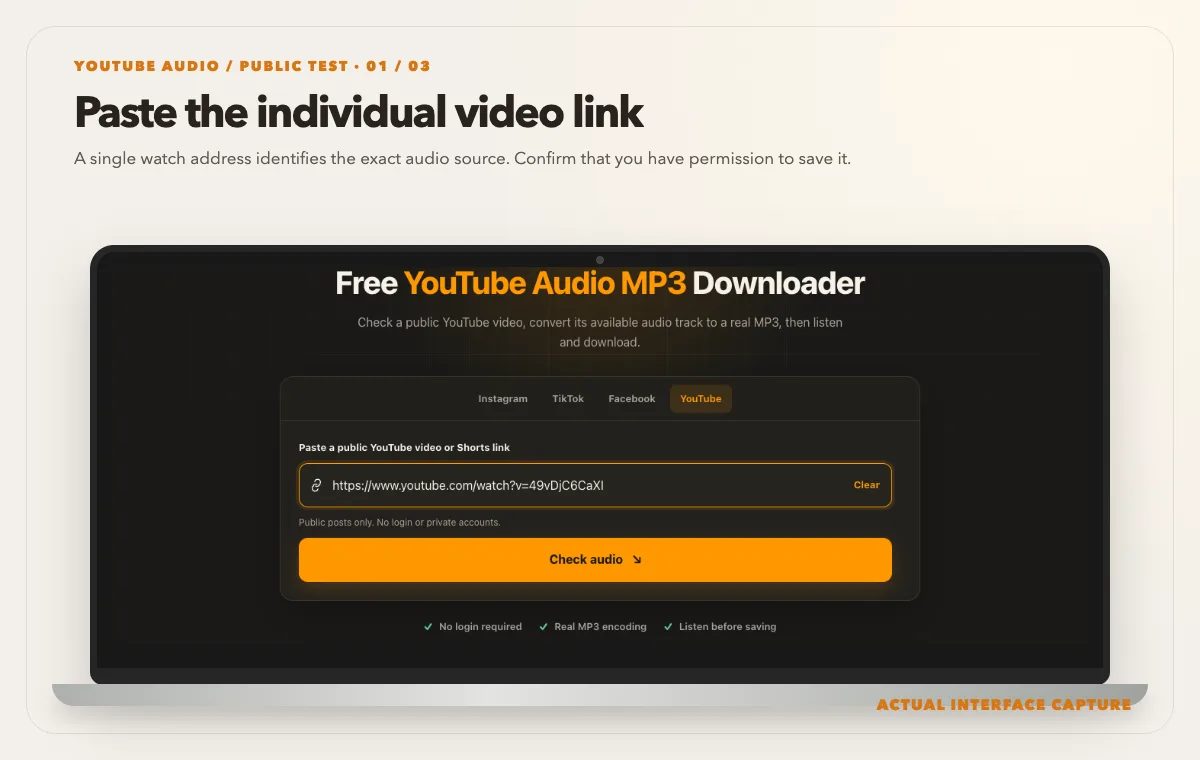
A single watch address identifies the exact audio source. Confirm that you have permission to save it. Device mockup contains an actual tool-interface capture from the tested public sample link. Review the exact video title, duration, audio option and source-size estimate returned by the check.
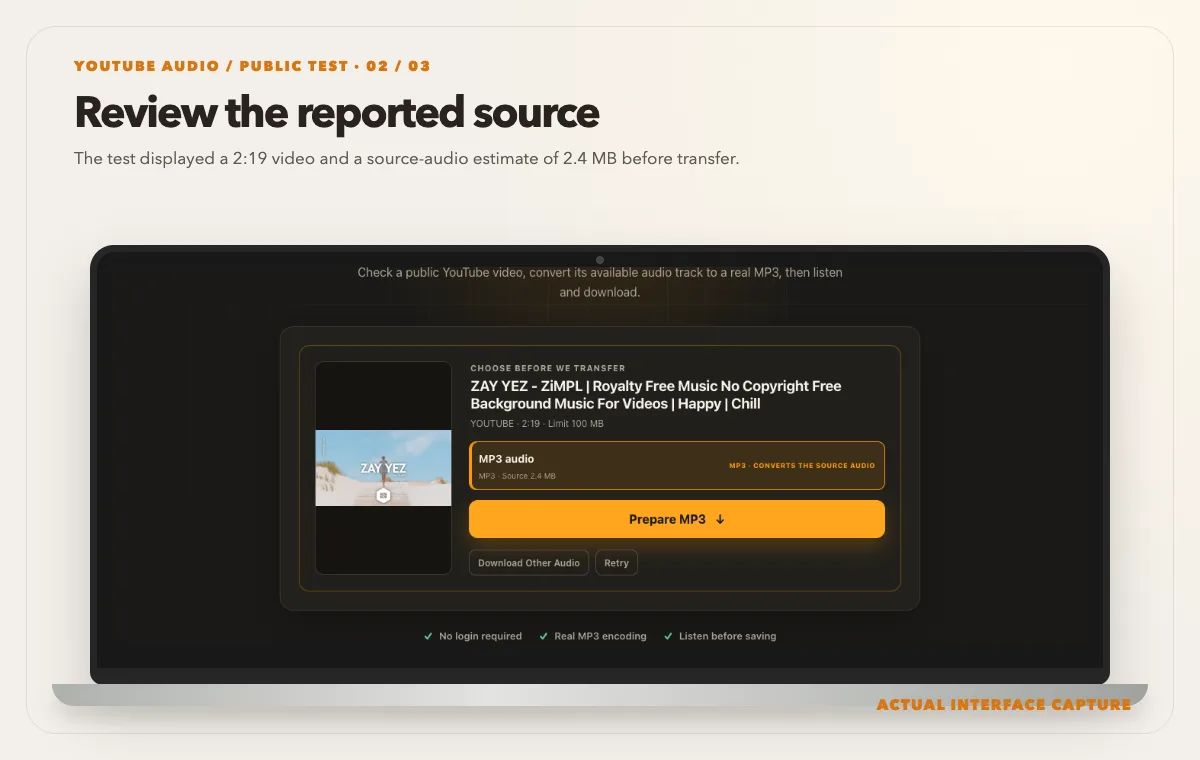
The test displayed a 2:19 video and a source-audio estimate of 2.4 MB before transfer. Device mockup contains an actual tool-interface capture from the tested public sample link. Choose Prepare MP3 only after confirming the source. Wait for the ready state before saving and listening to the file.
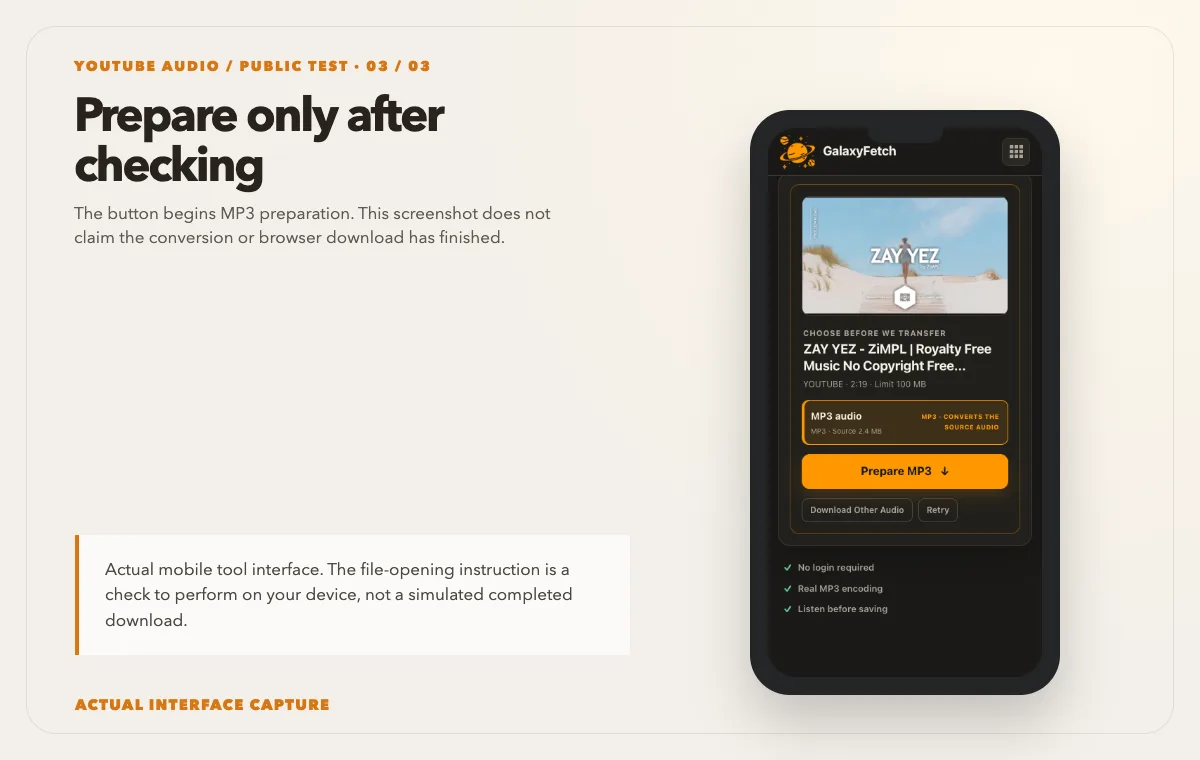
The button begins MP3 preparation. This screenshot does not claim the conversion or browser download has finished. Device mockup contains an actual tool-interface capture from the tested public sample link.
Open the YouTube Audio MP3 Downloader and paste the individual public video URL. Use the check control and read the information returned for that video. The tool should not assume that every watch page has the same audio track or that every video can be converted. If an audio option is offered, start the preparation and wait for the ready state. Save the MP3 to a location you can find, then open the file from that location in a player.
I checked the audio tool on 1 October 2026 with the user-supplied public watch link shown in the images above. The video was 2:19 long and the analysis offered one MP3 audio option with a source-audio estimate of 2.4 MB. That is an estimate before transfer, not a measured completed MP3. The third image shows the Prepare MP3 button before conversion. To judge any conversion you complete, inspect the saved file’s format and duration, then listen to its beginning, middle and end.
Do not judge completion by the spinner alone. A conversion may download source bytes, extract or encode the audio, add cover art, and prepare a temporary link. The browser may show measured progress for some of those steps, but exact remaining time depends on source speed, runtime, and the chosen processing route. If a long video stops at the same point twice, record the source URL and visible error category before retrying with a different source.
Once the ready link appears, save the file promptly. Temporary links are meant for delivery, not permanent hosting. The service may use direct or edge delivery for certain complete files and private temporary processing for conversions. A fifteen-minute link lifetime does not mean no server or storage ever handled bytes. It also does not mean the MP3 disappears from your computer fifteen minutes later. The copy you saved is yours to manage within the permissions you have.
Check the MP3 rather than its name
A filename ending in .mp3 is useful but not proof of valid audio. Open the file in a local player, compare its runtime with the video, and listen at several points. If the video is twenty minutes long but the MP3 ends after forty seconds, the transfer or conversion was incomplete. If the audio begins late, note whether the public video itself has an introduction without sound. If speech sounds unusually fast or slow, check the player's speed control before blaming the conversion.
Inspect file information when quality matters. A trustworthy player or audio editor can report sample rate, bitrate, channel count, and duration. Those numbers are clues, not a quality certificate. Encoding a poor source at a high bitrate does not make it better. If you need an accessible lecture archive, a transcript may be as important as the MP3. If you need a music production master, the platform copy is normally the wrong source even when the MP3 plays perfectly.
The tool may place the video's own thumbnail into the MP3 as cover artwork when a usable image is available. Artwork helps identify the file in a music player, but it is not part of the audio signal. Missing artwork does not mean the sound failed. Conversely, a beautiful cover image does not prove that the track is complete. Verify the actual playback and keep the source URL in your records. If you distribute the audio, rights in the video thumbnail may be separate from rights in the recording.
For a long lecture, make a note of two or three timestamps in the YouTube player before converting. Check the corresponding moments in the saved MP3. A spoken phrase, applause, or slide transition can help you tell whether the audio is continuous. Do not expect timestamps to match to the millisecond: platform processing and encoding may add a small offset. Large gaps or a missing ending are the problems you are trying to detect.
Lectures: accessibility and context
A lecture rarely stands alone as audio. The speaker may say “as you can see here” while pointing to a chart. If your goal is studying, keep the video link, slides, and notes with the MP3 so the meaning is not lost. A transcript or subtitles may be a better study aid for searching terms or translating content. A student with permission to keep a personal audio copy should still follow course and institution rules about sharing recordings with others.
If you recorded the lecture yourself, check whether the speaker's audio is clear enough before investing time in conversion. Excessive room noise, a quiet microphone, or audience questions away from the mic will remain in the extracted file. The conversion does not perform a full restoration or create a missing microphone channel. A local audio editor can improve some issues on a working copy, but a clean original recording remains the better source.
Organize educational files by course, module, and date. Write a filename that includes the session topic instead of the entire video title if the title contains long promotional text. Keep a short source note in the same folder. If you plan to circulate a recording to classmates, ask the lecturer or institution first. Consent to record for personal study is not necessarily consent to republish a class discussion.
Podcasts: recover an episode without losing the master distinction
Podcasters sometimes publish an audio episode as a video with a static image or a simple camera view. If your original episode export is missing, the public video may provide a usable listening copy. Verify whether the video includes exactly the same edit as the podcast feed. Platforms may carry different intros, advertisements, or corrections. Compare the runtime and a few distinctive phrases with your feed or production notes.
Do not replace an archive master with the extracted MP3 without labeling it. A production master may be WAV or another lossless format; the video may already contain compressed audio; and a fresh MP3 conversion is another generation of compression. Name the recovered file accordingly, for example with a youtube-recovery suffix. If you later find the original export, keep both until you have confirmed which edit was published where.
If you are republishing the recovered audio in a podcast feed, check rights in music, guest recordings, and advertisements. A license that covered the video upload may not cover a different distribution channel or territory. Verify loudness and intro/outro in a player before submitting a replacement feed item. The downloader supplies bytes; it does not clear rights or perform podcast mastering.
Music: a license matters more than the button
Music presents the highest risk of confusing access with permission. A song can be public on YouTube yet fully protected by copyright. A claim that a track is “royalty-free” in a title or comment is not enough; find the actual license and check attribution, commercial use, modifications, and distribution terms. If you produced the track, keep your original mix and stems. Extracted MP3 from a video is a convenience copy, not a substitute for your masters.
If a creator offers a separate authorized download, use that source. It may provide better audio and clearer license terms. If you are evaluating a licensed track for a private edit, an MP3 may be useful as a reference, but do not publish a video or product with it until the rights are confirmed. A cover thumbnail displayed in a player can include separate artwork rights. Save the license page or contract alongside the audio rather than relying on memory.
Troubleshooting with evidence
The tool says the source is unavailable. Reopen the exact video in a signed-out browser. Removed, private, age-restricted, or region-limited media may not be accessible to a public extractor. If your own video is private, use your creator account's official tools. Repeating the same public check will not grant private access.
The MP3 is silent. Check the original video first. Some uploads genuinely have no audio. Then try another local player and inspect the audio track information. If the source has sound and the MP3 does not, the selected track or conversion may have failed. Report the exact URL and error, not a password or cookie.
The artwork is wrong or missing. Cover art depends on the thumbnail available for that video and the conversion pipeline. It can also be cached by your music player. Refresh the player's library or inspect the file in another app. Do not confuse an artwork issue with a sound issue. If you need publication-grade artwork, use the image you own and have rights to distribute.
The length is shorter than the video. Play the ending of both sources. A truncated MP3 may result from an interrupted transfer or a source that stopped responding. Try one fresh preparation after checking connectivity, then use a permitted original or official export if the same section repeatedly fails.
The file will not open. Confirm the browser completed the download and the file has a reasonable nonzero size. Do not rename an unrelated file to .mp3. Try a reputable local player and inspect the media type. If it is invalid, delete the failed copy after retaining any other good copy and run a fresh check.
The link stopped working. Prepared delivery links expire. Recheck the public source for a fresh link. The expiration protects temporary access; it does not affect an MP3 that was fully saved to your own device.
Which audio copy is useful?
| Copy | Good for | What to verify |
|---|---|---|
| Creator’s audio master | Editing and archiving your own recording | Keep the original project and license |
| Converted MP3 | Portable listening to a permitted source | Check duration, voice, and ending |
| Video download | Keeping picture and sound together | Check video and audio playback |
Read the next guide
If speech accuracy matters, download the caption track separately.
For a complete copy of your own video, keep the video backup too.
Frequently asked questions
Will the MP3 sound as good as the original recording?
Not necessarily. The audio in a YouTube video may already be compressed, and MP3 conversion can add another lossy stage. Use your original WAV, AIFF, or project export for archiving and production whenever it exists. Judge the converted file by listening, not by a large bitrate label alone.
Can I extract audio from a private video I uploaded?
A public-link tool is not the right path for private uploads. Use your creator account's official download or data-export features, or locate the original recording in your own archive. Do not provide account credentials to a third-party site.
Does the MP3 include the video's thumbnail?
The current audio workflow can add the video's available thumbnail as cover art. That is a convenience feature and may depend on whether the source image can be retrieved. Always verify the sound separately; cover art does not validate the audio.
Can I use a royalty-free song from YouTube in a commercial project?
Only if the actual license permits your specific use. Read its attribution, commercial, modification, and distribution conditions and retain evidence. A title, hashtag, or comment saying “free” is not a license. When in doubt, ask the rights holder or choose a clearly licensed source.
Why does a long video take time to convert?
The source audio must be retrieved and prepared, and the result may require encoding and artwork embedding. Source speed and runtime matter. A progress indicator can show measured work, but it cannot guarantee a fixed finish time for every video.
Does a short-lived link mean the service never stores the audio?
No. A conversion may use temporary private processing or storage even though the delivery link expires quickly and the cleanup process removes old objects. Direct and edge routes behave differently. Keep sensitive masters in your own controlled systems rather than treating a public conversion service as an archive.
Keep the right copy for the right job
An MP3 extracted from a permitted public video is useful for listening, review, and some recovery situations. It is not the source project, a license, or proof of audio fidelity. Copy one exact video link, check the offered workflow, save the result, listen at several points, and label it with its origin. For lectures, keep context; for podcasts, preserve the master distinction; for music, verify the license. These habits make the resulting file genuinely useful instead of merely downloadable.