“Original resolution” is a phrase that can mislead people looking for an Instagram photo. The image a photographer uploaded may live in a camera archive as a large RAW file or a high-quality export. Instagram can resize, recompress, crop, or transcode what it delivers to viewers. A public image tool can save the best rendition it can actually retrieve, but it cannot guarantee the untouched camera original. This distinction matters when you need the picture for a permitted design task, a personal backup, or a research record.
This guide focuses on one photo in an individual public Instagram post. It explains how to get the correct post link, inspect the real delivered dimensions, save the image without accidental screenshots or upscaling, and check rights before using it elsewhere. Multi-photo carousels are a separate case because each slide needs to be identified and saved. A profile grid is not a direct link to one image.
Define what “best available” means
The best available file is the largest or most suitable genuine rendition exposed by the source for that post, not an enlarged version produced by a download site. Pixel dimensions tell you how many samples the file contains, but they do not prove that the source photo had that quality. A 1600-pixel image enlarged from a 640-pixel preview may be larger in file size and still contain no new detail. Inspect fine edges, text, hair, and subtle gradients at 100% zoom.
Format matters. A JPEG, WebP, or another delivered format may behave differently in your editor. Renaming image.webp to image.jpg does not convert it; it only makes the filename inaccurate. If a work application requires JPEG, make a separate converted copy with a trusted editor and retain the original downloaded file. That allows you to compare results later and avoids repeated quality loss from conversion after conversion.
Cropping matters too. Instagram's public display may show a square or portrait crop, while the creator's camera file contained more of the scene. A downloader can retrieve what Instagram exposes for that post, not pixels outside the published crop. If you need the complete uncropped image for a licensed campaign, request it from the photographer. A site that adds blurred borders or generative fill has not recovered the original composition.
If the photo is yours, check your camera roll, cloud backup, and editing exports before downloading a public rendition. Your original may contain more detail, embedded color profile information, and editing flexibility. A public copy is useful when you need to confirm the exact published crop or when the original is lost, but label it as a recovery version.
Find the post that contains the image

Open the photo itself in Instagram and copy the individual post link. A single-image feed post commonly has a /p/ address. A profile URL points to an account with many posts and does not tell the tool which photograph you want. A direct CDN URL may expire or carry a temporary signature; the stable post link is more useful for checking the image later. Confirm that the page shows the correct creator and picture.
If the post has dots or arrows indicating multiple slides, it is a carousel. A single-image page is not the right workflow for every slide. Use the carousel-specific process and inspect each item. A post can mix photos and video, which makes “download the image” ambiguous. Write down which slide you need before proceeding. For a team, save the source URL and slide number in the project note.
Check that the post is public without using a logged-in session. Private-account pictures are outside a public-link tool's scope. If it is your own private content, use the account's official information export or your original images. Do not enter your Instagram password or paste browser cookies into a public downloader. A website that needs your account session for a supposedly public single photo is creating a separate privacy and account-security risk.
Save a genuine rendition
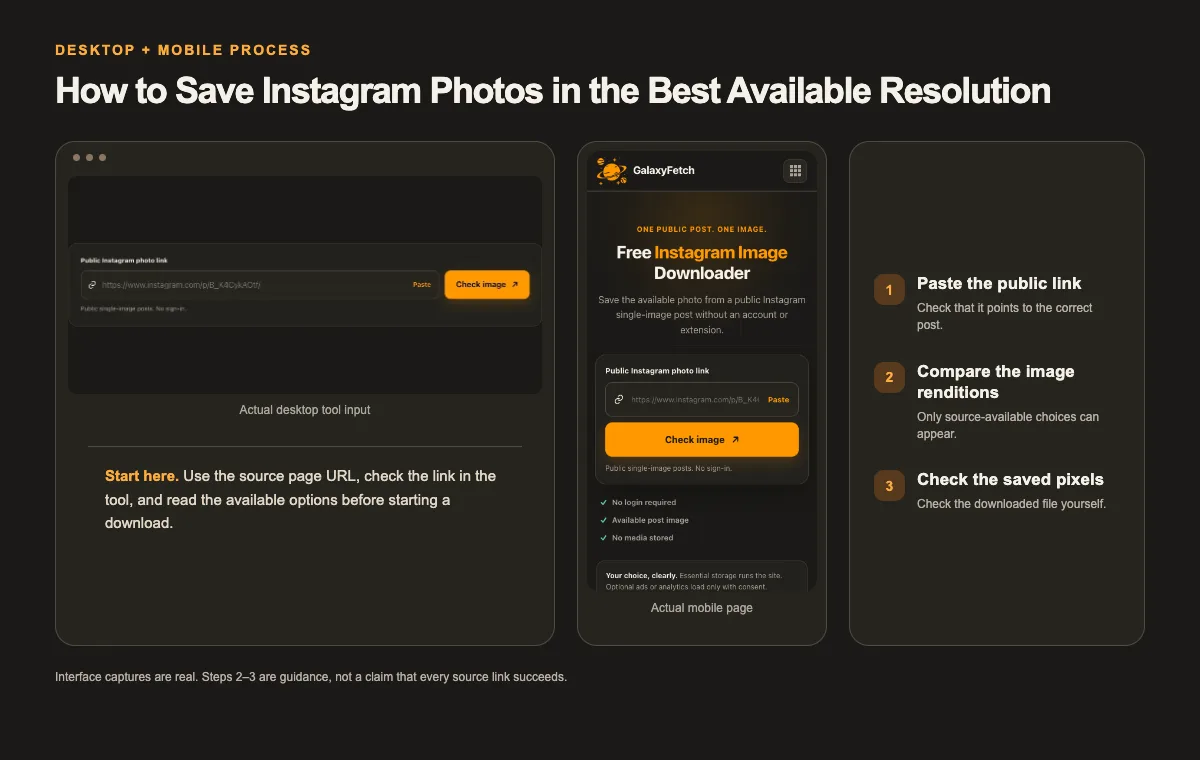
Open the Instagram Image Downloader, paste the public post URL, and check the image. Review the single centered preview and any actual dimensions or format information provided. Use the download control to save the file, then inspect it in your device's file manager. The picture shown on a page may be scaled to fit the layout; its on-screen width is not its intrinsic pixel width.
I checked the single-image tool page on 1 October 2026. Its configured example post reached a result with one image; a separate multi-image carousel URL was correctly rejected by this single-photo workflow. Those checks support the one-photo-versus-carousel distinction, but they do not establish the downloaded image's dimensions or permission for reuse. The screenshot here shows the actual input interface rather than a fabricated result. Check the saved image's measured width, height, and format for your own permitted post.
Save one source version first. If the tool offers multiple genuine sizes, compare dimensions and visible detail. Do not assume that “HD” means uncropped, uncompressed, or identical to the camera original. If you need a smaller copy for a slide or email, downsize a working copy locally; keep the best source-available file untouched. This avoids using a small download for a large design later.
Put the image in a folder with a descriptive name. Keep the post URL, creator handle, retrieval date, permission basis, and your chosen file dimensions in a nearby note. Instagram handles and captions can change. A source record lets you verify the image's provenance even after the local filename is changed for a project.
Check the file after the browser says “downloaded”
Open the saved image from the actual destination. On iPhone, the file may be in Files rather than Photos; on Android, it may be in Downloads before Gallery notices it. On a computer, reveal the file from the browser's downloads list. Check that it opens, displays the complete scene, and has a nonzero size. A thumbnail preview in the browser is not proof that the download finished.
Inspect image information using your operating system or a trusted editor. Note width and height in pixels, format, and whether an alpha channel is present. A portrait file may look narrow on a desktop but still have adequate vertical resolution. A small square can look good in a phone feed yet be unsuitable for print. Match the file to its intended use. Avoid making a blanket claim that one pixel count is “high quality” for every project.
Compare the downloaded image to the public post. Are faces, text, and edges the same? Did the tool return the correct slide? Does the crop match? If the result has an unexpected watermark, frame, or recomposed background, investigate before using it. A correct file should represent the source as delivered, not add branding or alter the creator's work. Keep the original result unchanged while making permitted edits in another copy.
Color can differ between browsers and editors because of profiles and display settings. If a brand color is critical, the social-platform rendition is not a reliable master. Request the creator's original export with the agreed color space. Do not treat a slight display difference as automatic evidence that the downloader damaged the file; compare the same file in more than one color-managed viewer.
What a public photo copy can and cannot do
A saved rendition can preserve the visible post for a personal or authorized reference. It can support a design review where exact original pixels are not required. It can help a creator recover the version that was actually published. It cannot restore a RAW image, Lightroom adjustments, layers, or areas cropped out before upload. It cannot establish copyright ownership, and it cannot make a low-resolution source suitable for a billboard by changing its dimensions.
For a photographer, the best practice is to archive the original capture, the edited export, and a record of the posted crop. If the Instagram copy is the only surviving file, preserve it, but note its source and date. Avoid repeatedly exporting JPEG from it during edits. Work from a duplicate and keep a checksum if the recovery is important. The original public copy is a reference point for later comparisons.
For a client or collaborator, request an approved asset package rather than depending on a social download. It should include the intended resolution, crop, usage rights, and credit line. A public image copy may be convenient while drafting, but it is not a substitute for delivery of licensed production assets. This is especially important if the post contains a model, product, artwork, or recognizable private location.
For an academic or journalistic reference, keep the source URL and context. An image detached from its caption can be misinterpreted. The date of a post and the date you retrieved it may be different. A screenshot of the entire post can sometimes document context, while a source image file preserves visual detail; they serve different purposes. Use and share each only within your rights and editorial standards.
Troubleshooting a photo result
The link is unsupported. Confirm that it points to a public single-image post. A profile, Reel, Story, carousel slide parameter, or direct signed CDN address may require another workflow. Open the post and copy its main URL again. If the post contains several slides, choose the carousel tool instead.
The file is smaller than expected. Check pixel dimensions, not only file bytes. Instagram may expose a processed rendition. If another genuine size appears, compare it. If none does, ask the creator for the original. Upscaling a small preview cannot restore lost detail.
The image appears centered with empty space around it. That may be the page's responsive preview layout, not padding baked into the saved file. Open the downloaded image itself and check its actual boundaries. Do not crop the saved file based on what a website card looks like.
The wrong image appears. Confirm the post URL and whether it is a carousel. Tracking parameters or img_index values can be misleading if the tool normalizes to the post. Use the carousel workflow for an exact slide and verify the selected item before downloading.
The download link expired. Recheck the public post to get a fresh result. Temporary image URLs can expire. Save the file promptly once offered; an image already stored on your own device is not removed by link expiry.
The file will not open in an old editor. Inspect its real format. WebP may need conversion for older software. Convert a copy to a supported format in a trusted local editor and retain the downloaded original. Merely changing the extension is not conversion.
Permission is separate from resolution
A public Instagram photo may be copyrighted, contain a trademark, or depict someone whose permission matters for your use. The ability to download a high-resolution version does not grant permission to use it in a campaign, repost it, or sell it. Ask the photographer or rights holder, check the applicable license, and keep the permission record. Crediting the creator is often important, but it is not always enough on its own.
If you are saving your own image, consider rights in commissioned photography, graphics, or artwork before redistributing it. If an image is described as Creative Commons or public domain, verify the original source and the exact terms rather than relying on a comment. Rules differ by jurisdiction and purpose. This is practical guidance, not a legal opinion.
The site's requested-file result should not become a public browseable gallery. The service may deliver an image directly or through a short-lived route; some paths may use temporary processing. Do not promise that every user-requested byte avoids server infrastructure. Editorial article images and site branding are separate permanent assets and should not be confused with a visitor's temporary download.
Know which photo you saved
| Source | What you get | Limitation |
|---|---|---|
| Public post rendition | An image offered by Instagram | Not necessarily the camera original |
| Screen capture | Pixels shown on your screen | Includes display scaling or interface crop |
| Photographer’s master | Original edit or camera file | Must come from the rights holder |
A quick verification checklist
- Use the individual photo-post URL and identify whether it contains one image or a carousel.
- Compare offered dimensions without assuming they match the uploader’s camera original.
- Open the saved image and inspect its crop, file type, and pixel dimensions.
Read the next guide
For a Reel cover rather than a photo post, read the cover-image guide.
If the post is a moving Reel, use the Reel guide.
Frequently asked questions
Can I get the exact original photo uploaded to Instagram?
Usually you should not assume that. Instagram may process the image and expose renditions for display. The largest public file can be the best available download without being the creator's original camera or editing export. Ask the owner for the original when your project needs it.
Why does the saved picture have different dimensions from the website preview?
The preview is scaled to fit a responsive page. Its CSS display size is not the image's intrinsic pixel size. Open the saved file and inspect its width and height in an image viewer. Compare the actual content rather than measuring the website card.
Does this page download every photo in a carousel?
No. It is intended for a single public image post. A carousel contains multiple slides and needs a workflow that enumerates them. Use the carousel-specific page and verify each result rather than assuming the first picture represents the whole post.
Is a larger file always sharper?
No. File bytes depend on format and compression. More pixels can help only if they come from a genuine higher-resolution source. A large upscaled image can be softer than a smaller authentic rendition. Inspect detail at 100% zoom.
Can I repost a photo after downloading it?
Not merely because it was public. Get permission or a license that covers your intended reuse and consider rights in people, logos, and artwork shown. An internal reference copy and a public repost are different uses.
What should I do if the image result expires?
Run a fresh check of the public post and save the new result promptly. Link expiry limits access to that temporary URL. It does not delete a file already saved on your device.
Save the image, not a promise
The professional workflow is to choose the right public post, save a genuine source-available rendition, measure it, and record where it came from. If you need the camera original, request the camera original. Clear language about that difference is more useful than calling every file “original HD.”