“Best quality” is a useful goal only when it refers to a file that actually exists. Instagram can deliver a video in a processed form that differs from the creator's original export. A downloader can inspect and save the accessible rendition, but it cannot recreate missing detail, a higher frame rate, or a pristine camera file merely by putting an HD badge on a button. If you are backing up your own feed video or saving a public post with permission, your best result begins with the right link and an honest understanding of the source.
This guide is about a video in an individual Instagram feed post, commonly addressed with a /p/ URL. Reels usually have /reel/ links and a separate workflow. A multi-image carousel needs an image-oriented tool. Those distinctions matter because the page behind a profile grid or a shared post can contain several media items, and a tool must know which type you meant. The steps below focus on one public feed video and a playable MP4 result.
The source limits quality before the tool begins
When a creator uploads a video, Instagram processes it for delivery to viewers. That can change size, codec, bitrate, and sometimes the rendition chosen for a particular device or connection. The public page does not usually expose the exact original file from the creator's editing software. If you own the video, check your camera roll, export folder, or cloud archive first. A public-site download is a recovery or convenience copy, not the master.
Resolution is only one part of quality. A file with more pixels can still look muddy if the source was compressed heavily. Watch a section with movement, small text, or dark gradients to judge whether detail survived. Listen to the audio as well. An apparently sharp poster frame may hide a silent or damaged MP4. The tool should present only formats it actually detects for the post, and it should not offer a selectable 4K file when the source has only one ordinary MP4.
If you are comparing two choices, check their real dimensions and file types. Do not equate a larger number in a menu with the original upload. If there is only one option, that may be the only compatible complete file exposed for that post. Rechecking repeatedly will not turn one source rendition into several authentic qualities. Ask the creator for the original if your permitted project truly requires it.
Copy the individual feed post
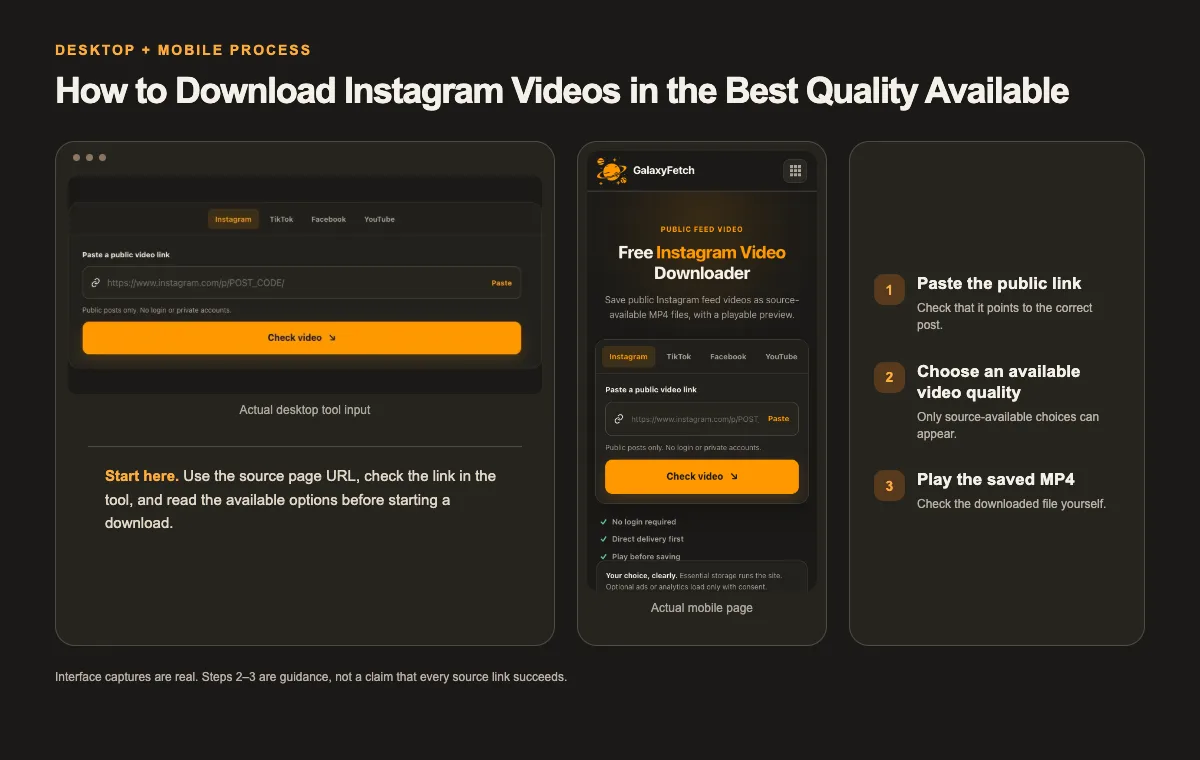
Open the video post, not the profile grid. In Instagram's app, use the post's share or link control to copy its address. On desktop, click through to the post detail and copy the URL from the address bar. Confirm that the link opens the video you mean. A typical feed-post path contains /p/ and a shortcode. Tracking parameters after the post address may be unnecessary, but they are not a separate piece of media.
If the link opens a Reel, switch to the Reel workflow. If the post contains several photos, use the carousel image workflow. A post can include mixed media, so check what is visibly present before describing it as a single video. A downloader cannot infer “the third slide” from a profile URL alone. Keep a note of the creator's handle and post URL, particularly if you are collecting approved assets for a team.
Open the link while signed out or in a private browser window to see whether the post is genuinely public. A public-link service should not be expected to enter a private account, access a close-friends post, or use someone else's login session. Do not send your Instagram password, session cookie, or two-factor code to a download site. If it is your own private media, use Instagram's account information export or your original files instead.
Check first, then choose and save
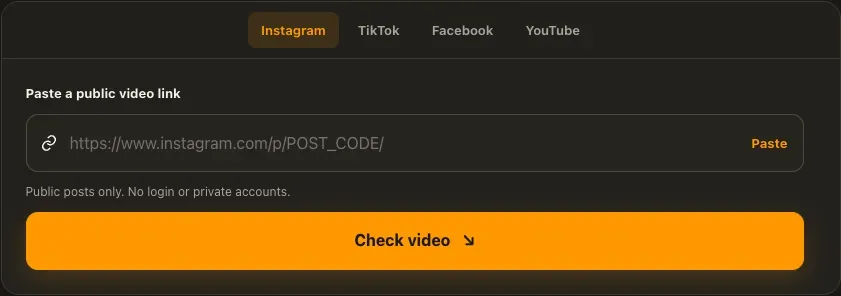
Open the Instagram Video Downloader, paste the individual public post URL, and select the check control. Wait for the analysis card rather than treating the first thumbnail as a completed file. The result should show what the source exposes. If an MP4 option is available, choose it and let the site prepare the file. Play the ready result when a player is offered, then use the separate download control to save the MP4 to your device.
I checked the Instagram feed-video page on 1 October 2026. It uses a post-link field, a source-checking stage, and a playable result stage in its current design. That is an interface check, not a guarantee that the same source quality will appear for every post. The screenshot here is a real capture of the input interface, not a fabricated quality card or proof of a completed MP4. For any file you save, play a local copy and compare its framing and sound with the public post.
The site may prefer a verified direct source or edge path for a compatible complete MP4. It can use a proxy or temporary private storage when the source rejects direct delivery or needs preparation. The presence of a short-lived link therefore does not prove that every byte bypassed the service infrastructure. What matters to the reader is that the requested file is not intentionally placed in a public browseable archive and that a local copy should be saved promptly.
If the tool shows an estimated size or says the size is calculated during transfer, do not assume a fault. Some source servers do not provide a reliable content length before the transfer begins. Leave space on your phone or computer and check the final saved size afterward. The browser's Download folder may contain an incomplete copy if you close the page or lose the connection before the transfer finishes.
Check the finished MP4 on your device
Play the local file from its saved location. On a phone, that may be Files or Downloads rather than Photos or Gallery. On a computer, use your browser's downloads list to reveal the file and move it to the right project folder. Watch the beginning, a section with motion, and the end. Verify that the audio plays if the source video has audio. A still image on the result card is not enough; it may simply be the poster for a video that failed to prepare.
Inspect the file's dimensions and codec if quality is important. The extension .mp4 tells you the container, not the camera original or universal compatibility. If a local app refuses to play it, try a trusted media player before converting. Keep the downloaded file unchanged and make a separate working conversion. Renaming a different file to .mp4 will not repair a codec or truncated transfer.
Compare the saved file with the public post at the same display size. Enlarging the local file to fill a large monitor can make normal compression more obvious than watching on a phone. Judge whether it is adequate for your permitted task rather than chasing a quality label. If you need a high-quality source for a client edit, ask the creator for their export instead of repeatedly downloading the public rendition.
Keep the source URL and permission record with the file. For a campaign asset, include the date and the approved use. If the file is a backup of your own post, note that it came from Instagram rather than your original camera roll. These small labels prevent accidental reuse of a low-quality public copy as if it were the production master.
Workflows that benefit from a copy
A creator can use a recovered public MP4 to confirm what viewers saw on a particular date. That is useful for checking captions, a published cut, or a post that differs from the master export. A social-media manager with the creator's permission can use a copy for internal review when the original project folder is temporarily unavailable. A researcher can save an allowed reference with source information for analysis. Each scenario needs a different standard of quality and a different permission check.
For an archive, preserve more than the video. Keep the caption, thumbnail or cover, original post link, and a record of publication date when you have them. For an edit, prefer the original export and licensed music files. For a presentation, check whether the public file is readable at the size you plan to show it. One downloaded MP4 does not answer all three needs equally well.
If you plan to move the file to another platform, check rights in every element. A soundtrack available within Instagram may be licensed only for certain uses on that service. A collaborator's footage may have limited permission. Owning the post or managing the account does not automatically grant rights in all embedded material for a new distribution channel. A technical download does not clear those issues.
Troubleshooting a feed-video download
The post link is rejected. Confirm that it points to one public post. A profile page, a Story, a Reel, and a direct image CDN URL are different link types. Open the link in a browser and copy the final post address. Remove punctuation accidentally copied from a message. If it still fails, record the exact public URL and the visible error category.
The page says the media is unavailable. Check whether the post still opens while signed out. It may have been deleted, made private, restricted by region, or temporarily blocked at the source. A downloader should not bypass those controls. For your own content, return to the account export or original file.
Only one quality appears. That may be the only complete compatible rendition exposed. Avoid websites that promise several “HD” buttons without proving they map to distinct files. If your need is a high-resolution master, ask the creator. The public post can be a lower-quality delivery copy.
The preview is an image but no video plays. Wait for the actual ready state and check whether the MP4 preparation succeeded. A poster image is not a video file. If the player cannot load the result, try a fresh check once and note the error. Do not assume the browser downloaded an MP4 merely because a thumbnail appeared.
The saved file is silent. Play the public post to establish whether it has sound. Check mute state in your local player and inspect the file in another app. If the source has audio but the result does not, a track-selection or delivery problem may have occurred; report the URL and option label.
The link expired. Short-lived links are normal. Recheck the public post for a new one and save it promptly. Expiry does not delete an MP4 you already saved locally. It also should not be described as proof that every temporary processing copy vanished at that exact second.
Rights and privacy boundaries
Instagram's public visibility setting allows people to view a post; it is not a universal license to redistribute the video. For another creator's footage, ask permission, use a clear license, or rely on a valid legal basis for your particular use. Credit is good practice but does not automatically replace permission. Copyright, privacy, performer rights, and music rights can all matter. This guide cannot give legal advice for every jurisdiction.
For your own post, an official account export may provide broader account data than a one-link tool. It may be the better route for a complete archive. A public downloader is not a way to access private posts or to recover the original camera file. Do not paste private credentials into a public tool. If the video contains a private person or sensitive location, consider whether you should create and share another copy at all.
The service's file-delivery paths vary. Some complete sources may pass directly to a browser or through an edge relay, while others can require temporary processing or storage. The result is intended for the requesting user, not a public page listing their requested file. A short-lived link and a cleanup sweep are operational controls, not a zero-storage guarantee. Write your privacy explanation in those precise terms.
Pick a usable video copy
| Choice | Useful for | What to inspect |
|---|---|---|
| Available complete MP4 | Quick browser download | Confirm picture and sound |
| Higher adaptive option | Permitted editing when offered | Allow processing, then check playback |
| Original creator export | Source-level archive | Request it from the rights holder |
A quick verification checklist
- Copy the individual public post URL, not a profile or a private share.
- Choose only a quality the source actually offers.
- Play the saved file and inspect motion, framing, and sound before reuse.
Read the next guide
Saving a Reel instead of a feed video? Follow the Reel-specific guide.
Need only the audio track? Read the Instagram MP3 guide.
Frequently asked questions
Can a downloader restore the exact file I uploaded?
Usually no. Instagram may resize, recompress, or otherwise prepare media for public delivery. If you still have your original export, use it as the master. A public download is a rendition and should be labeled as such in an archive.
Why is there no 1080p choice?
The source may expose only one compatible file for that post, or the extractor may not be able to verify another rendition. A truthful selector lists available files rather than inventing qualities. Check actual dimensions after saving if your work depends on them.
Does this work for Reels or Stories?
This page is intended for public feed videos. Reels have a separate link pattern and tool. Stories are short-lived and may require account access; they should not be treated as public feed posts. Always use the workflow matching the actual link.
Where does the video save on a phone?
It usually goes to the browser's Downloads or Files location first. Photos or Gallery may require an additional save or import step, depending on the device. Check that the MP4 is complete before moving it into another library.
May I repost a public Instagram video?
Not merely because you could save it. Obtain permission or confirm a license and consider rights in music, images, and people shown. An internal review copy and a public repost are different uses.
Does the site keep my file forever?
The current design uses short-lived delivery and cleanup for temporary processing, with direct or edge routes where possible. Some media still may pass through private temporary storage. The intended result is not a public file gallery, but it would be inaccurate to claim no server or storage is involved for every source.
Choose a real file, then verify it
Copy the individual public post, inspect what the source genuinely offers, save a permitted MP4, and play the local result. That sequence is more reliable than chasing a vague “best quality” badge. If the public copy is not good enough for your purpose, the professional next step is the creator's original export, not an artificial upscale.